
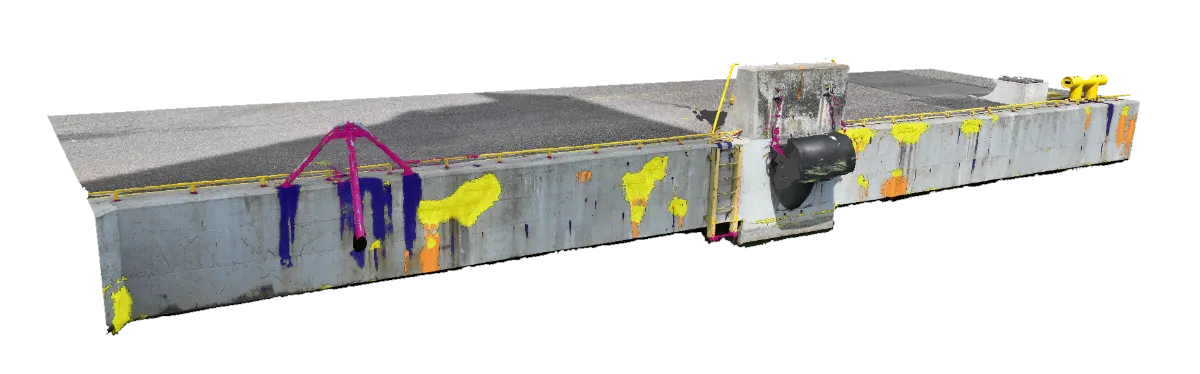
Works with the survey data you already produce.
Drone surveys, Metashape projects, GLB meshes, handheld image sets. Infrascan connects to what you already have. No new sensors, no new capture workflows, and no vendor lock-in on the hardware side.
Upload your drone surveys, handheld images, or 3D models. Infrascan runs AI defect detection and projects results onto your 3D model. Your engineers run inference, review, annotate, export.
Infrascan turns your existing survey data into a structured, queryable record of your asset's condition. No new capture workflows, no new hardware, no PDF that sits in a folder.
Drone surveys, Metashape projects, GLB meshes, handheld image sets. Infrascan connects to what you already have. No new sensors, no new capture workflows, and no vendor lock-in on the hardware side.
AI runs across the entire dataset. Every crack, spall, corrosion instance, and deformation is found, classified, and assigned a severity. Nothing depends on an inspector's line of sight or available time on site.
GeoJSON, shapefile, GeoTIFF, PDF inspection reports. Every output carries the defect coordinates, classification, and the model version that produced it. Ready for your asset register on the day the run completes.
A PDF inspection report tells you what was found. It cannot tell you where, relative to last year's survey, or in comparison across your portfolio. Infrascan produces records that live in systems, not documents that sit in folders.
The same dataset that serves an asset owner's maintenance planning also gives an engineering firm something more than a report to deliver to their client.
You commission inspections to stay ahead of maintenance costs and meet regulatory requirements. What most inspections deliver is a document. What you need is a dataset: where defects are on your asset, how they compare to the previous survey, and what needs attention before the next scheduled inspection.
Your clients are under pressure to move from periodic manual inspections to continuous, data-driven asset management. Delivering a GIS-ready defect dataset alongside your inspection report positions your firm as the partner that makes that shift possible, using the photogrammetry workflow you already run.
Drone images, Metashape projects, GLB meshes, or handheld image sets. Self-serve upload or managed delivery.
Drone · Metashape · GLBThe model runs across the full dataset. Cracks, spalls, corrosion, and deformation are found, classified, and assigned a severity.
Cracks · Spalls · CorrosionEvery defect is placed at its real-world position on your 3D asset. Coordinates are site-specific and CRS-explicit.
Real-world coords · Per-site CRSGeoJSON, shapefile, GeoTIFF, or PDF inspection reports. Results feed directly into your asset management system.
GeoJSON · Shapefile · PDFThe questions we hear most from operations leaders, technical evaluators, and procurement teams.
Metashape projects, GLB meshes, drone image sets, and raw image collections. If you have Metashape, Pix4D, ODM, or ContextCapture already deployed, your existing output is the input.
Yes. Upload, run inference, review detections, annotate, and export — the full loop without Mavisoft in the workflow. Managed delivery is available for teams who prefer to hand the pipeline off.
Each detection made in 2D image space is back-projected onto the 3D mesh using the original camera positions and a frustum ray-casting step. Every defect sits at a real-world coordinate on the asset's surface.
Yes. Every finding references the model version, workflow version, and site CRS that produced it. Evidence packages include frames, overlays, and geo context.
Typically a single asset or defined structure section. Your team uploads an existing drone survey, Infrascan runs inference, and you walk away with a structured defect record and a working review workflow — not a proof of concept.
Pilots are short, fixed-scope, and structured to recover implementation cost before any platform license commitment. Email teddy@mavisoft.com or use the form.